Dayton/Morel MTM LCR Speakers for Basement Theater

caddrawingspeakers.gifA very good friend of mine recently moved into a new house with an unfinished basement. There’s nothing that cries out Home Theater like a big empty basement with nothing in it. So naturally I offered to build this friend of mine a set of speakers to go into his soon-to-be-rocking new home theater. With a tight budget and the only criteria that the speakers had to pretty much rock for movies, I set out to design a medium-end LCR (left-center-right) speaker system to go into his wall next to his 78″ screen.

He had already cut out holes in his wall to accommodate a pair of speakers I had mentioned wanting to build. The design changed since then but we were left with the same size cutouts in the wall, so I was on a hunt to pick out some drivers that would still fit in the allotted space – which was basically 8″ wide by 40″ high by as deep as we need. I originally was planning on doing an MTM design with a pair of Dayton 6″ Reference Woofers and 1″ reference tweeter. But when I ran the cost numbers it was a bit on the expensive side (we’re doing 3 sets of speakers so the final cost = everything needed to build times 3, and it adds up fast). In addition, we weren’t really looking for an audiophile-esque sound, since the speakers will probably never get used for any kind of dedicated 2-channel listening, and my friend just wanted something that plays movies, sounds decent, and plays loud enough to mate with his big 78″ screen.

I looked at every 6″, 6-1/2″ and 7″ woofer Parts Express carries with an intent to buy one of the lesser expensive drivers, but didn’t want the cheapest one’s either. That’s when I ran across Dayton’s 7″ aluminum cone woofers which despite being only $18 a piece, really had some decent specs, low fs at 37Hz, a modern, clean look with a silver aluminum cone, nice rubber surround and some healthy Xmax at 4.25mm. PE recommends a 0.76 cu.ft. box tuned to about 32Hz for an f3 of 35Hz. I’ll double the box volume for our MTM design. The frequency response of these drivers looks very good up to about 1.5kHz, where there’s a slight dip and then the infamous cone break-up modes kick in at around 5-12kHz. It will be critical to get rid of everything above 2kHz in order to achieve decent sound out of these budget drivers that isn’t harsh and fatiguing. So with the right crossover, this driver should sound great and with a pair of them, our efficiency is up 3db from a single driver, as well the power handling doubles, so they should play nice and loud with his Onkyo receiver. More on the crossover design later.

For the tweeters I did the same thing with the woofers, I looked at them all (this is where having PE’s catalog really comes in handy). Clicking around the Internet can be tiresome, even at cable modem speeds, but a catalog I can browse specs of multiple drivers all at a glance and with ease. Some of my favorites tweeters I’ve used on several speakers are made by Vifa and Morel. They offer low-cost, high-performance tweeters and have detailed data sheets including FR and Z plots, which are critical for designing any kind of decent crossover. So after going back and forth for days on Vifa and Morel, I settled on the popular Morel MDT-20. It’s a 1-1/8″ soft dome tweeter with the high efficiency I need to match up the the pair of 7″ woofers, has a very low fs (650Hz) which will allow me to set the crossover point below 2kHz without damaging the tweeter and keep those woofers operating in their optimally flat region. The cost of the MDT-20 is just right for our budget and should be a great tweeter for this set of MTMs with a flat, on and off-axis, frequency response.

Anyway, I’ve gone on enough about that, here’s a quick picture of the box of goodies that showed up on my doorstep today. The 7″ aluminum woofers look great. The stamped steal frame is cheap, I would have preferred cast baskets, but aesthetically they look great. And the Morel MDT-20 really looks sharp with its super delicate fabric dome and large rear cavity. The plastic faceplate isn’t quite as fancy, but again for the cost, it should be a great tweeter and should sound really good when mated up with the pair of woofers. Just as long as I don’t completely screw up doing the crossovers, I think we’ve got a great set of speakers in the making. More to come!

Getting new speakers and crossover parts is always fun.
pepartsspeakers.jpg

This will give you some idea into the crossover I’ve concocted up.
pe-order-form.gif

The cutouts in the walls of the basement where the Left Center and Right speakers will soon go.
basement1.jpg

Posted in DIY Audio | Tagged , , , , , , , , , , , , , | 1 Comment

Bought a Dell Notebook – Inspiron E1505

So I finally broke down and bought a laptop. I’ve been on the hunt for one for last few months, just watching the deals come and go, watching the prices drop and the hardware specs get better and better. Ultimately I knew I would just have to jump at some point and get whatever was the best deal I could find at the time when I was ready to buy. So when I found a coupon deal from Dell to get $500 off any E1505 priced over $1399, I decided now was the time.

Coupon deals from Dell range anywhere from as little as $100 to as much as $750 and they come and go with the wind, but any way you slice it, $500 off is a pretty good deal, one that I don’t think comes around very often, at least not off of a $1399-priced notebook. Not to mention the $49 off the ATI Mobility X1400 graphics card is an added bonus through tomorrow. A few weeks back I was bummed that I didn’t jump at a deal offering $379 off an E1505 priced at $1078. Now I’m glad I waited, of course. A month from now it will probably be the same tale, but I’ll wish I had waited. Anyway, here’s what I got for $1491 – $500 – $49 = $942 plus tax, free shipping:

Intel Core 2 Duo T7200 2.0GHz 667MHz CPU
– $250 upgrade over the Pentium (gag) dual-core. The reasons here are probably obvious. C2D is the only way to go. The T7200 offers 4MB of L2 cache and a 2.00GHz clock, which makes it just that much better than the T5600. Still not the fastest laptop processor you can buy, but the fastest one available in the E1505 lineup. Most people will agree, you can never go wrong with more processing power, as long as its within your budget, get the fastest CPU you can afford. I suspect the price drop may be due to the upcoming Santa Rosa platform, but for me the T7200 will be plenty juice for my needs – DVDs, pictures, graphics, Internet, videos, word processing, etc.

Windows XP – I’ve used Vista, I’ve messed around with Vista, I’ve got Vista RC2 on my main computer, but for this laptop, I really just wanted XP. Though this laptop would run Vista just fine, it will run XP just that much better. I’m just not sold that Vista is going to improve or increase my productivity at this stage of its release. It looks cool, its fun to use, it’s got some cool features, but its unnecessary in a laptop who’s hardware configuration is just barely enough to run it. I’m going to throw Ubuntu 7.04 on the recovery partition and play around with that instead. Not only that but I somehow saved $45 by configuring with XP over the same configuration with Vista, go figure? The Ubuntu configuration was the exact same price as the XP one, apparently since it came with the NVidia Go7300 instead of the Radeon X1400 which was $49 off.

15.4″ UltraSharp Wide Screen WGXA+ with TrueLife – This was a $50 upgrade that I debated back and forth. I’m not a big fan of the glossy screens, but I didn’t want the default 1280×800 resolution. I didn’t feel like forking over an extra $100 for the WSXGA+ resolution (which at 1680×1050 is more screen than my current 19″ – all on a relatively small 15.4″ screen) because I thought the icons and fonts would be too small to read and I really didn’t want to spent that much more for the higher resolution. 1440×900 seems like a good compromise between price and resolution. Though I’ve never actually seen any Dell laptop screens, I’m hoping it looks good and doesn’t have too much glare and has a good amount of usable, viewable workspace.

1GB 667MHz DDR2 SDRAM – This was actually a $25 upgrade from the 533MHz RAM as the default configuration. I felt the $25 was a drop in the bucket at this point to at least get the RAM up to the bus speed of the CPU. I’ll most likely sell the RAM later on eBay and pick up 2GB from NewEgg for only $80. Dell wanted $125 to upgrade to 2GB, so I opted for the 1GB for now to save money knowing I can upgrade later on at my leisure for less.

8x DVD-R/CD-R Drive – $40 upgrade from the CD burner to get the DVD burner which is worth it in my opinion. You never know when you’re going to need to back up a few gigs of data or burn a DVD of the latest vacation videos for the family. Small price to pay to be able to burn to a DVD. And it’s a dual-layer burner to, so that’s nice.

80GB 7200rpm HDD – This was a $45 upgrade over the 120GB 5400rpm HDD and I struggled with making this decision as well. Do I need the extra space? Or do I want the extra speed? Reason would tell you that the 7200rpm drive will be appreciably faster than the 5400 drive, but if you actually look at performance comparisons, depending on the manufacturer and type of drive, it’s anybody’s guess which drive is actually faster. Most people argue that yest it is noticeably faster when booting into Windows and loading applications, transferring data and playing games. Others say no you can’t tell, the faster spinning drives run the battery down faster, are hotter, are more prone to failure, etc. Well whatever the cons, the main one being how much the 7200rpm drives cost ($100 more than a comparable 80GB 5400rpm drive) I decided to get the 7200rpm drive and just use external drives for storage. This laptop is actually going to replace my current P4 desktop computer (going to be going DTR with this E1505), so it needs to be at least on par, if not better, than my current setup. The 7200rpm drive just made sense for my configuration. Not to mention I had to get the price of the laptop over $1399 in order to apply the coupon.

256 MB ATI Mobility X1400 Graphics – This is the default option and they were doing a deal where you save $49 through Thursday, so that kind of pushed me to making this decision sooner than next week when the actual $500 coupon is suppose to expire. From what I’ve read this is a great card. I’m not into gaming or anything, and from what I’ve read this card is pretty bad at playing any of the latest games. It should be fine for playing DVDs and just general graphics stuff. I’m hoping I can run the VGA out into my Samsung 19″ at its default resolution of 1280×1024 and use both screens when I’m sitting at my desk.

9-cell 85watt/hour Battery – This one seemed like a no-brainer. The 6-cell batteries don’t last more than 2-3 hours (so they say) but with the 9-cell I should get at least 4-5 hours, or so. It’s a small price to pay for longer runtime away from a power chord. And the 9-cell it suppose to fit into the laptop snug, and not stick out, like the HP 12-cell ones do. Besides batteries are expensive, I didn’t want to have to upgrade this later wishing I had done it when I order it.

Intel PRO/Wireless 3945a/g – So this is a $29 upgrade over the Dell 1390. This was mainly based on some comments I had read over at www.notebookreview.com where people were complaining about the Dell card, saying the range was horrible, and the connection speed was lousy. Most people with the Intel card were happy as clams, so the $29 seemed worth not having to hassle with some lame wireless card. Since I’ll be using the laptop to do stuff on the Internet a lot, I didn’t want that part hanging me up and giving me problems. The cost is small, relative to the entire laptop, but can be a big impact on the end user experience. I’m planning on picking up a LinkSys WRT54GL router in the next few days. They should play nice together, I’ve never had issues with LinkSys and just about every other brand I can’t stand (D-Link for example) but maybe it’s just me.

And that about sums up my new Inspiron E1505. It’s not going to get here for a couple of weeks, but when it does I’ll be sure to write up a quick review of it, as if there aren’t enough reviews about the E1505 already. One thing I already know I don’t like are those lame white bumpers that surround the edges and the silver I could do without, but oh well, it’s cheaper than any other their other lines, and looks aren’t that important to me anyway. For the price and the options I got, this should be a great notebook for many years to come.

UPDATE: Check out my post on upgrading this laptop to Windows 7!

Posted in Computers | Leave a comment

Different Names for the Same Thing Sheet Music

Last month my wife had a professional piano tuner come by the house and tune our piano while I was at work. I got home that day and she said, “Come sit down and play the piano and tell me if it sounds any different.” Yeah it sounded different, it actually sounded good for a change. The guy said it was basically an entire half step down from standard tuning. It’s kinda hard, if not impossible, to figure out songs when your piano isn’t in tune with the rest of the world. That A note is dead on 440 Hz now. So I was listening to ‘Plans’ the other day and Different Names for the Same Thing came on and so I sat down and started to figure it out – to test out the new piano tuning. Sure enough the piano sounded right on and I could actually play along with the song and it sounded perfect. I haven’t been able to do that in years. After a few hours I think I got most of down, so here it is, the latest unofficial piano sheet music for Different Names for the Same Thing by Death Cab For Cutie. Again, it’s probably not note for note, but it’s pretty close. Enjoy, and comments are always welcome! Next week I’m going to try and get Brothers on a Hotel Bed transcribed also, I’ve already got it figured out and can play it all the way through, just need some time to write it up.

Different Names for the Same Thing Sheet Music

Cliff Notes: Basically the song is in the key of Dmaj. The dominant chord is an inverted Dmaj with the lower A note changing up and down, A, A#, G etc. The chorus goes to a Bm, F#m, Gmaj, Dmaj. The top note is an F# which plays along with mostly every chord. Not every note is played at the same loudness, I’ll play every other chord softer, and the D’s on the lower hand I don’t play as loud, but then I like to overemphasize the A, A#, G, F#, A,G#,G, F# during the verses, since they are the only notes that actually change. Oh, and this is only the first part of the song, before the drums and bass kick in.

Posted in Music | Tagged , | 4 Comments

It’s All in the Domain Name

Just about everybody at some point in their life has either registered a domain name or currently owns a domain, even if they’ve done nothing with it. So I started thinking about all the domains I’ve bought over the years, which although isn’t many, there’s a story behind why I registered each one. So here’s the history of some of the domain names I currently own as well as some of the names I registered once upon a time.

aktiondanlogo.gifwww.aktiondan.com – 2007 – This is my most recent .com domain registration which at the moment is nothing more than a landing page which points visitors to www.danmarx.org. I guess I’ve always been kinda bummed that I couldn’t get my name in a .com, and the guy who did register www.danmarx.com hasn’t done anything with the name in almost a decade and has the domain registered for at least decade more. So www.aktiondan.com was my way of picking up a .com that was still unique to me. I may do something with it later on, but for now it’ll be placeholder, until I come up with that single really great idea.

floppy2cdlogo1.jpgwww.floppy2cd.com – 2003 – I woke up one morning and decided that the entire world had hundreds of floppy discs that were collecting dust on a shelf and that if given the chance would love to have converted to CD for easy access and preservation. This idea stemmed from the small pack of 3.5″ 1.44mb floppies I had on my shelf collecting dust that contained old journal entries, school projects, lab reports, that I thought would it be great if I had all these on one CD instead of wasting away and never getting used. Using all that sophisticate mathematics I learned in college I had determined that I could fit over 450 floppies onto one compact disc. Who had that many floppies lying around? I have no idea, but if someone did, I was going to copy them all to a CD for them. I would have a shipping service come pick them, I would pop them in my massive array of floppies drives and one by one (or ten by ten) start transferring all of Joe Shmoes old love letters onto a single CD which would then be mailed back to him in a single envelope and all for a very reasonable fee. Well the idea never made it out off the runway (my fancy-pants spreadsheet basically said the concept needed to convert an unrealistic amount of floppies in an unrealistically short amount of time to even make anything) and pretty much crashed and burned the same week it was born but not before I snatched up what I thought was a clever domain name and made some really lame logo.

aktionrclogo.gifwww.aktionrc.om – 2003 – A few years ago I got back into RC cars via a little popular car called the Micro RS4. I got so hooked on this little 1/18th scale car that my desire to make it faster and faster just wouldn’t quit. After trying out just about every motor and battery I could find, I knew the end all big-block conversion would be to stuff a whopping 540-sized motor into this car and then surely, no one could top it. Several prototypes later and the Micro Hybrid 540 Conversion Kit was born. During that time I had met up with another fanatic named Chris who helped fine-tune the design and a couple of months later Aktion RC was formed. I registered the name and we’ve been selling 540 conversion kits ever since. If you’re into RC then you should check out this site, we’ve got some pretty cool videos of this tiny car hitting over 51mph as well as a small history of all the different kits we created over the years. This was at least one of my domain names that didn’t completely flop.

hostmypicslogo.jpgwww.hostmypics.com – 2002 – Picture hosting back in the day was extremely limited. Nobody let you direct-link to pictures for placing in forums, blogs and web sites, and bandwidth was so limited that half the time the hosting provider had cut off the offending bandwidth abuser and placed some lame marketing image its place. I decided it was time to change the way hosting providers treated customers images. I figured I could offer up picture hosting that uncapped all the rules of traditional picture hosting by allowing embedded images with no watermarks, giving everyone a whole bunch of bandwidth and only charging them $5 a year. There were only about four other sites doing this same thing, and they all charged way too much and didn’t offer all the untethered use of images like I was going to do. And then shortly after the idea fell into the toilet. Without going into the details, I just decided I didn’t want to do it, to have to deal with everything that would have been involved to maintain such an endeavor, seemed like a huge hassle. But again, not before registering the domain and actually making a full-fledged working web site that never actually went live. These days picture hosting is much better (Flickr, Picassa), and the most popular providers offer all the things I wanted to, but they even one-up my original idea – it’s free.

www.danmarx.org – 2000 – So this is my main site that pretty much hosts everything I’ve ever written about on the net and contains all sorts of odds and ends from R/C stuff to DIY speakers, to my Ocean Blue Guitar tab site which contains not quite all the tabs of one of my all-time favorite bands The Ocean Blue. You can read about my old High School band Terminal Bliss and even download a few .mp3’s off our album that we’d released in 1993. So even if all the other domains end up going by the wayside, this one should be around for a while.

audioinnovationlogo.jpgwww.audioinnovation.com – 1999 – This was the first ever domain name I registered and to this day I still kick myself for letting it go. I know it seems stupid now, but at the time when registration was actually $37/year and me being a starving student, decided I needed to pay rent one month instead of renewing my domain. The site had already ranked fairly high on Google when searching for DIY subwoofers as well and I (not knowing anything about how Page Rank worked) didn’t think anything about moving the domain to my newly registered site at www.danmarx.org/audioinnovation, which as far as Google was concerned, didn’t even exist. It didn’t take long for someone to snatch up my expired domain and of course do nothing other than use it to advertise real estate. What’s that got to do with audio? Well apparently nothing since the domain was later sold to a domain reseller who has been holding it hostage ever since. They’re offering it up to anyone willing to fork over $3,338. Boy that $37 sure seems like chump change now. Ah well, it’s all in the past, but I did regain my Page Rank status, if you type Audio Innovation into Google and hit I’m Feeling Lucky, you’ll be taken straight to my site. Take that you lame domain reselling place.
And that’s about it, everywhere I’ve ever been, or not been, on the net. There are a bunch more names I’ve considered registering at one time or another as random ideas have popped into my head, but so far this is it.

Posted in General, Internet | Leave a comment

540-Powered 3-Cell Lipo RC18T Hits 47MPH

So I fixed up my Hobbyzone Super Cub today to go flying, charged up my new 3-cell lipo pack, and waited for the wind to die down so I could fly it. 7 hours later the wind was still blowing strong and I was itching to play with some R/C stuff. So I pulled down my RC18T off the shelf, which the last time I played with it I had dropped a 540-sized motor into it with a 2-cell lipo battery. Then a year later the lipo had expanded to twice its regular size and was basically dead, so it got thrown out. Otherwise the truck was in great shape and actually drivable, with the exception of needing a battery. That’s when I had an idea, why not try and fit the 3-cell lipo pack from my Super Cub into my RC18T? Sure a 540 in that truck is already overkill, but how about 11.1V to a 540 motor in this little 1/18th scale truck, that’s not overkill, is it?

So about 10 minutes later and with the help of some tape, I had strapped that 3-cell lipo battery into my 540-powered RC18T, and this thing was about to rock. I plugged in the pack and clipped on the body and ran the wheels a few times just to get a feel for how much power this thing was going to have and was quite impressed with how much the tires ballooned as they expanded to about twice their normal size under the centripetal motion of the high-velocity spinning. The Epic Binary Outlaw stock 540-motor can spin at around 33krpms at 7.2V, the nominal voltage rating for this motor, but once you bump that up to 11.1V of the 3-cell lipo, we achieve a maximum free-running RPM of just over 50krpms. That kind of speed you typically only see out of low-turn, current-hungry modified motors. I was running a 30T pinion gear and the stock 60T spur gear which amounts to a 2.0 gear ratio. Combine that with the internal gear reduction of the differentials which is 2.5:1 and we get a final gear reduction of 5.0:1. That means those wheels with this setup are spinning along at just over 10,000rpms. The total rollout (given the tires I’m running which are about 2.2″) high equates to about 7″ per revolution or 70,000 inches per minute which amounts to about 66mph. However there are many other real factors that that keep the truck from reaching that kind of speed. I usually knock off about 25% of the free running rpms due to loading, drag, and friction, which brings our real-world estimated top speed to 50mph. I was able to measure only about 47mph for a top speed (using the distance-over-time method), and that was just the one run I was able to measure and calculate. Other runs up and down the street felt faster, so in all fairness I believe this setup can reach 50mph. But WOW, was it fast. I mean 50mph is fast, it feels fast, it eats up so much ground so quickly and when it flips and rolls, it just rolls end over end endlessly. It is a ton of fun to drive too. The rear of the truck would get sucked down as I accelerated lifting the front up just like my old T-Maxx used to do. It looked super cool.

So what’s next? Make it faster! There’s a few things that could be done to make it faster. The quickest one would be to gear up and pop on a larger pinion. The downside is is harder on the motor, the ESC and the lipo to run taller gears, and as it was, both the motor and the battery were getting pretty hot with the FETs on the ESC being the hottest part (hey it’s only rated to 8.4V, that fact that it worked at all was pretty amazing). So even though gearing up might provide some short-term increase in top end, the car already felt like it needed to be geared a few teeth lower, so if anything, I should gear down. The other option is to run a faster motor, like a 19T or even a 14T or lower. The problem with the hotter winds is they are harder on the battery, and the cheap little 3S pack I have is barely rated to 18A continuous so no doubt a faster motor will burn up that pack, which means I’d have to get a new 3S pack, most likely bigger pack which can handle the higher-current demands of the faster motor, but they they get big, and they get heavy and they cost $$$. So I suppose for now it’s fast enough and hasn’t cost an arm and a leg to get up there. Making it faster from here on out would take some more money. I’m actually thinking about getting one of the Mamba MAX brushless motors/ESC combos from Tower Hobbies. They’ve got 4 different winds, the 4600kV one being just about right on par with my Epic Binary Stock motor, though having all the benefits of brushless over brushed, it would be at least a little faster than my current setup while being easier on the battery pack, lasting longer, etc. But it’s not reliability that I want, it’s speed (well, and I’ll take the reliability too). Using the same formulas I applied above, if I got the fastest Mamba MAX they make topping out at a whopping 7700kV (that’s over 85krpms unloaded at 11.1V) and even though it’s not rated to handle a 3S lipo, I’m sure it can handle the voltage fine under the right conditions, being light on the trigger, and with the right gearing. Given the same gearing as I currently have, a 30T pinion and 25% loading factor I could achieve a top speed of 84mph. Though in reality with the faster motor I should gear it much lower, so if I dropped to a 25T pinion the result would be a 6:1 final drive ratio which equates to about 70mph top speed. Sure that sounds fast, but it’s only 20mph faster than my current stock brushed motor, and that Mamba MAX costs nearly 7X what that Epic motor cost me. Though for the coolness factor, it would sweet.

After going through 3 packs, and trying it out in the dirt, I toasted the spur gear and broke another turnbuckle. In the dirt this thing was insane, but completely out of control, I couldn’t gain any traction. And then I remembered why I hate driving this thing in the dirt – rocks get in the spur gear every 10 seconds and stop the car dead. It’s definitely better in the street. After my truck was out of commission, I pulled out the battery, dropped it back into my plane, and went flying.

Kicking Up a Little Dirt
rc18t540small.jpg

Posted in R/C Cars | 1 Comment

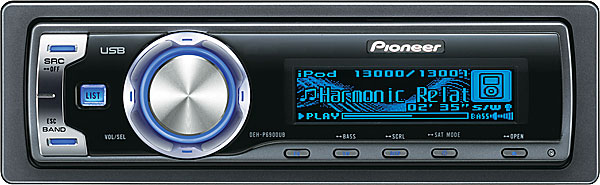
Review of Pioneer DEH-6900UB iPod-Ready HU

pioneerdeh-6900_small.jpgFor my birthday a couple of weeks ago I got the new DEH-6900UB head unit from Pioneer for my GTI. In anticipation of getting the new HU, I bought a new 12″ sub and mounted it in a old Q-Logic box, ran some 4 gauge wire to my hatch, and dug out an old 300W amp. This way I could rip out the stock HU and install the new one along with the sub and amp all in one shot. Now that I’ve played around with the new deck for a couple of weeks, I thought I’d write up what I like and what I don’t like. Overall this is a great head unit. One of my main reasons for choosing it for me was the direct USB iPod compatibility. This HU works using the original white USB cable that came with my iPod – no adapters required. And if you don’t have an iPod it will accept any USB-compatible device up to 250GB in size. The 6900UB has a clean front panel with very few buttons, thank goodness for the remote however which adds a few that are sometimes necessary, such as quick-attenuation and pause. It also allows you to adjust the volume while in the Audio mode adjusting settings without going back out into the main display. The one big knob on the front does just about everything: it rotates left-right, it clicks up and down and clicks left and right and pushes in. It takes some getting used to, I’ve found the remote is almost easier to navigate, and it has a little wheel-type button as well that replicates the actions of the main knob. But the clean look is very attractive and the OEL display is very nice. Although it’s blue, it’s not an exact match to the blue in my ’04 GTI. During the day you’d never notice since the dash lights aren’t on, and it’s basically blue which is the factory color for the instrument lights, so for the most part it matches. At night it’s a different story and the blue lights from the dash are much more purple than the bright whiter blue of the display. It’s not too bad, at least the whole display is just the one color, blue, so it’s not like there are green/red/orange buttons to worry about trying to match and looking ugly too. It would be nice if it matched better, but once you pull out the factory radio, you might as well accept that your car isn’t going to have that stock look anymore. At least that stock sound is gone, or mostly.

Changing out the factory radio in the GTI makes a HUGE difference. It sounded like an AM radio compared to this new HU, even with the stock speakers. One feature I love about the 6900UB is the built-in crossover for the integrated 22×4 amp. I’ve got the stock components being powered by the deck right now (until I get another amp to drive my sub) and since the stock speakers have no bass whatsoever, it makes no sense to tax the HU trying to run lots of bass to them. So with the click of the master knob, I can turn on a high-pass filter to my 2 pairs of components and set it to cut off below 50, 63, 80, 100, or 125Hz. This way the HU can play just a little bit louder before distorting since it’s not trying to play any of the power-hungry bass. And this is typical of a multi-amp setup one might do. In addition, the sub-out also has a built-in low-pass filter which can be adjusted at the click of the big wheel. So in my case I’ve set the amp in the back to full-range mode and let the HU control the x-over frequency. This is great since it allows you to dial in just the right amount of upper bass from the driver’s/listening seat, instead of being hunched over in the trunk of you car with a flathead screwdriver trying to decide where to set the crossover point. After much messing with these two adjustments, I’ve settled on a 100Hz point for the sub and 50Hz for the front/rear components. This way the sub has the right amount of bass across the entire low frequency region, it doesn’t just play super low bass, and I get some overlap from the 6″ components in the cabin without running them too hard. There’s not an obvious “gap” in the response as the sound transitions from the subs to the other speakers. I’m not sure the stock speakers can play much below 100Hz anyway, but setting the x-over any higher created that separation effect in the music, or gap, like the sub and the components are in two different places or too far apart. The blend is perfect at the 100Hz/50Hz split.

Anyway, enough about that, onto how well this thing integrates with the iPod. Most people complain about the speed of connectivity with iPod-ready head units, accessing songs, artists and playlists just takes too long to be useful. However the Pioneer unit talks to the iPod wonderfully and just as quickly as you can spin and click that main knob. The iPod controls become dormant once the unit is connected and a cool little Pioneer logo shows up on the front. Nice touch. The main knob then does all the controlling and mimics the click wheel on the iPod itself, although not near as good nor near as fast. If you’ve got a lot of songs, say a 30GB iPod filled to the max, then finding individual songs can take some time, and a lot of rotating of this knob, especially if the song is by an artist whose name isn’t either at the beginning or the end of the alphabet. Accessing a Morrissey tune for example took me 1 minute 15 seconds and I was spinning the knob as fast as I could, unfortunately it only clicks through one artist/song/playlist per soft “click” of the wheel so it takes a lot of spinning. Had I been doing that while driving, I probably would have crashed. It’s actually quicker to just press down on the knob repeatedly rather than spin it. But the HU talks to the iPod just as fast as it can, it’s the knob that slows you down. Once you pick a song, it plays immediately. And then after all that clicking, unlike he iPod which when you go back to select a new artist will go back to Morrissey and let you scroll around from there, the Pioneer deck starts over at square one, artist A, so you’re back to endless scrolling to get to say a New Order song. This honestly isn’t a big deal for me since I usually just hit Shuffle All and let it play for weeks on end. I think Alpine has the right idea by splitting up the scrolling into 6 subcategories so you can basically jump from the A’s to the M’s in just two or three clicks instead of hundreds. For this HU however, you could just make several playlists that have the artists A-E, F-J, K-O, etc. and then accessing a favorite band would be much quicker. It just takes some creativity on your part to make a few key playlists that are useful to the accessing options of the Pioneer deck, even if they aren’t really playlists so to speak. UPDATE: I tried this technique, so-called, and it doesn’t work, so it’s back to drawing board.

Bottom line the deck is sweet. The OEL is nice and has some fancy little “entertainment” options as they call it, from moving waves to bubbles to a pair of analog style VU meters bouncing only slightly out of sync to the beat. I usually just keep it on the default background with the artist and song title showing. One thing the deck has turned on by default that drove me insane is what they call Reversing. Where the display inverts, every 10 seconds – super annoying when you’re driving at night, it’s constantly getting brighter every time it “reverses”. At least you can turn it off, which once I figured out how to do it, it got turned off for good. (See the comments below to learn how to turn it off). The 7-band EQ is nice, allowing you to dial in just the right amount bass, midbass, midrange, treble and upper highs. I’ve basically got it set up to be a smiley face. A little more bass, and a little more treble. Not to mention I’ve got the loudness set to HIGH which boosts the lows and highs by a massive +12dB. These stock speakers really do suck, but with a boat-load of EQ, they can sound half-way decent. Although the sibilance is enough to make one go deaf. But that’s typical of crappy tweeters and over-EQ’ing, not to mention playing mp3’s. Yes, it’s all a very bad formula for crappy sound. But for the most part it sounds okay. The bass sounds really good though. I’ve only got 150W (50×4 bridged to 150×1 with the other 2 channels unused) going to the one dB-500 12″ sub but it’s got plenty of thump, it plays super deep, and doesn’t quite drown out the stock 22×4 amp powering the components. But I’ve also got it dialed down pretty low. The gain on the amp is set almost all the way to MIN. Mainly because the HU allows for quite a huge range of sub level output, from -24 to +6. I’ve got it set to 0 and then if a song has too much bass I can dial it down to -3 or so, and if I want a little more, I can dial it up to +3 or +4. I’ve also got the sub set to invert polarity (reverse they call it) since when doing A/B comparisons, reversed appeared to sound smoother and blended with the other speakers better, and had more bass.

So there’s my massively long-winded review of the Pioneer DEH-6900UB which took me just about as long to write as it took me to install.

Pros:
Sounds great, 22×4 plays plenty loud even on stock speakers
Direct iPod integration w/o needing expensive extra cables/adapters
7-band EQ w/2 custom settings
OEL display visible in almost any light
Bass adjustment with just 1 button
4V RCA outs for front, rear and sub
Built-in crossover for high and low-pass
Plays DRM-encrypted .aac files (from iPod only)

Cons:
Accessing songs/artists is time consuming and difficult if you have lots of songs on your iPod
Artist List starts over every time you access it with no memory of ‘where you last were’
Display color may clash with some cars’ interior colors
Entertainment background options kind of cheesy (but kind of cool too)
Cannot access or watch videos/pictures on iPod while connected to HU

My Dash Torn to Pieces
tornaprtdash.jpg
Soldered Wires from Factory Harness Adapter to Pioneer Connector
solderedwires.jpg
Head Unit Installed with iPod Stashed in the Compartment Below
huinstalled.jpg
TC Sounds dB-500 12″ Sub
subinhatch2.jpg

Posted in DIY Audio | Tagged , , , , , , , , , , | 28 Comments