TC Sounds dB-500 Impulse Buy

I dropped by TC Sounds’ web site today and couldn’t believe what I read – they were doing a blowout on their dB-500 12″ subwoofer for only $75. Even though this driver is considered entry level from TC Sounds point of view, there’s a lot of high-end features that make it worth twice that price. I couldn’t pass it up, and knowing that TCS probably wouldn’t have this driver around for very long, I decided to buy it. I had barely even looked at the specifications or even ran any models to see how this sub would perform before clicking the Add to Cart. I love that so many companies accept PayPal now for making purchases, it makes buying things so much easier.

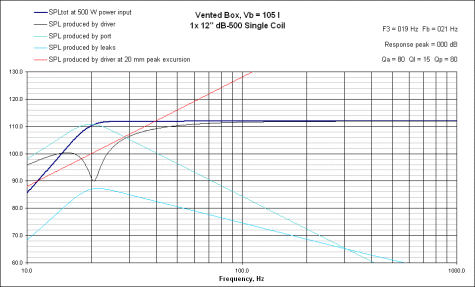
So later on today I sat down with Unibox and modeled up the dB-500 to see what kind of performance this thing is going to deliver. It looks as though anything between 3.0 cu.ft. and 4.0 cu.ft tuned anywhere from 19-23Hz is going to yield sub-20Hz f3’s and over 110dB SPL over most of the critical subwoofer frequency band. The smaller box (<3.4 cu.ft.) results in some peaking, a dB or so around 22-24Hz with a higher f3, while the 4.0 cu.ft. box has an impressive f3 of 18Hz. It appears as though the optimally flat response is achieved with a box that is 3.7 cu.ft. and tuned to 20.5Hz which yields an f3 of 18.5Hz and 112dB from 23Hz on up. That looks like it will be the design to shoot for. Now it's time to figure out if I have the room for a box that big, especially after taking into consideration the port. The recommended port diameter for a driver such as this (that can move a lot of air) without worrying about port noise and turbulences is at least 6.0". That could be tricky because a 6" port needs to be 44" long to tune a 3.7 cu.ft. box to 20.5Hz. Since I don't intend on making the box that long in any direction, I'll have to throw in an elbow in there. One should be enough, I want to avoid using two if I can. A port that size takes up over 1400 cu.in. of volume, so it requires the gross external volume of the box be quite a bit larger than just the 3.7 cu.ft. needed for the sub. In the simplest terms, a 22" cube made from 3/4" MDF with sufficient bracing would work. I'd like to build this sub into an end table for the family room. We need something on that side of the sectional, so if I can design the sub around the idea of making an end table, I should have plenty of room to get the box the size I need. I'm thinking about powering it with a Bash 500W plate amp from Parts Express. Anyway, I'll get some plots and pictures up soon, this sub is going to rock! vb_response_db-500-12.gif
db-500_sub.jpg

Posted in DIY Audio | Leave a comment

Dilbert and Old Drivers

I read this Dilbert cartoon over the weekend and thought it was pretty funny. Not much else is going on with me these days. I’m trying to get Fedora installed on my PC and so far can’t seem to burn the stupid DVD .iso without getting checksum errors. But alas, that’s a post for another day. I’m such a newb when it comes to Linux, but if I can figure it out, I’m hoping to be able to triple-boot into Linux, XP, or Vista.

dilbertcomputers.jpg

Posted in Computers, General | Leave a comment

Custom DIY Speaker Stands For Less

After I finished building my 2-way bookshelf speakers, the Monitor DX625 made from a 6″ Hi-Vi Research W6 driver and Vifa DX25GT 1″ tweeter, I began looking for a pair of speaker stands to put the speakers on. They needed to be the right height so that the tweeter was just below ear level when seated, they needed to be the right look, be nice and heavy, and not cost a fortune. I couldn’t find any that were the exact right height or within the cost that I wanted or the exact style I wanted, so I decided to build some speakers stands out of some scrap wood I had lying around in my garage. Of all the speakers I’ve built, I’ve never built a pair of speaker stands, so I thought this would be a great first-time project to work on. It turned out to be a lot of fun, and so much easier than building actual speakers, and the end result I think was well worth the time spent working on them. The design is extremely simple and possibly resembles some other speakers stands out there. The design was driven by what I currently had in the garage sitting around as scrap, waiting to be used for something useful.

Material: About 2’x2′ piece of 3/4″ MDF cut into 4 rectangles – two pieces 9″x11″ for the top platform and two pieces 12″x13-3/4″ for the bottom base. One 10-foot two-by-six (2×6) board. The two-by-six was cut into (4) pieces 26″ long to be used for the uprights in each speaker stand.

I cut all the edges of the (4) MDF pieces at 45 angle to give the speakers stands a more original and finished look, as well to match the speakers better. I sanded all the wood wood with 150 then 220 grit sandpaper and threw on a coat of Painter’s Touch flat black enamel. Once that dried I sanded everything down once again with 220 and put on another coat of paint. After that was dried, I assembled each piece by centering the (2) 26″ two-by-six uprights on the base and screwing them in with (3) 10×2-1/2″ wood nails. Then I attached the top in the same manner. The two uprights are mounted 2″ apart and allow enough room for me to touch up the paint if needed or for dusting. I put some putty in the six holes of each top base and put on two more coats of paint and let everything dry overnight.

That was about it. I took a few pictures and set them up with my 2-way speakers and tested them out. I think they look great, and only cost a fraction of what a commercial pair of speakers stands would have cost. And since all the wood, screws and paint I already had, it felt like it cost me nothing at all. But the benefit of having a real pair of speaker stands in the living room (instead of a pair of chairs from the kitchen table) was definitely worth the time spent designing, building, sanding and painting them. At some point in the future I may add a set of toe spikes to the base piece and speakers, but for now I like having the ability to easily rotate the speaker/stand as desired for more/less toe-in. Now it’s time to pull up a chair, pop in a few CD’s, and spend the afternoon enjoying some music.

Click here to view the CAD design/plans for these speaker stands.
Stop by www.danmarx.org/audioinnovation for more speaker projects.

woodforspeakerstands.jpg unpaintedspeakerstands.jpg spaintedpeakerstands.jpg

img_0194.jpg
img_0199.jpg
img_0200.jpg
img_0217.jpg
img_0245.jpg
img_0262.jpg

Posted in DIY Audio | Tagged , , , , , , , , , , , , , | 31 Comments

Poly-Quest 11.1V Lipo Rocks the Super Cub

The Poly-Quest pack arrived earlier this week and this weekend I finally got a chance to install the connectors, charge it up, and take it out for a few flights. Here’s how it all went down…

Initial Charge:
Discharge Details: 4.4A, 3.2V/cell, >600mAh or so (I forgot to look before starting the charge cycle)
Constant Current Charge Time: 2800 seconds (47 minutes) to reach about 1700mAh (77% capacity) at 2.21A, then CV charge cycle begins at 12.602V.
Constant Voltage Charge Time: 1600 seconds to reach 1983mAh at 12.602V
Total Charge Time: 90% capacity in 4400 seconds (1 hour 13 minutes) current was at 0.17A when I stopped it so I could go to bed. It was only dumping in 1mAh every 10-15 seconds and taking longer as the current dropped. I think it calls it done when the current reaches 0.10A. For the first run this should be enough to show off what the pack can do. Anything beyond 80% charged just results in more flight time anyway.

The next day I peaked the pack again, it only took about another 50mAh before beeping, and I dropped it into my Super Cub. It wasn’t the best installation job, it’s basically just floating around inside the cockpit, but as long as it doesn’t fall out it should be fine. I also took this opportunity to replace the cheesy small Tamiya plugs on the ESC/receiver unit with Deans Ultra plugs. The difference here is obvious. I took the plane outside, revved up the motor and gave it a good throw and was completely disappointed. I was expecting gobs of power and it felt like the stock 7-cell 2/3A pack. Actually lately, it’s seemed like it’s been slowing down with every run, it just hasn’t been feeling like it did when I first got it. The motor apparently has been losing its spirit after all these flights, so I bought a new motor. My LHS carries quite a few Park/Hobbyzone parts, so getting a new motor was only $9.99 and even though it says it’s for the P-51D, it has the exact same part/model number printed on the can as the stock Super Cub motor, as well as the same 12-pinion gear. I did a quick kV test on it and measured basically the same thing I did with the original motor, about 2590kV.

Second Charge:
Constant Current Charge Time: 2830 seconds (47 minutes) to reach 1717mAh (78% capacity) at 2.21 amps, peaks at 12.601 then begins CV charge
Constant Voltage Charge Time: 2084 seconds (38 minutes) to reach 2032 mAh (92.3% capacity)
Total charge time to complete: 4914 seconds (1 hour 22 minutes) ending at 12.6V and 0.10A.

It will take several charge/discharge cycles before the pack really starts to charge up to its rated capacity, but it’s no worry, I’m getting some sweet flight times already. I haven’t timed them, but it’s long enough that you almost kinda start to get bored, somewhere between 15 and 20 minutes. But it’s hard to be bored when the plane is flying around at some 40+ MPH with the wind and doing huge, wide-open loops and pulling huge maneuvers with ease. With the new motor and the 3S pack, flying the Super Cub has become fun again! The new P-51D motor made a HUGE difference, the old motor had just had it, but I put a lot of runs on it and brushed motors just wear out (that’s why brushless motors are so great). The difference between the 3S pack and the 8-cell NiMH pack is huge, the plane just pulls so hard through the air. I can do super huge loops, or super tight loops, and even loops where I end up higher in the air after the loop than when I started the loop. I can do death spirals and inverted flight with very little inputs from the Tx. In fact on my third flight I was able to sustain controlled inverted flight for almost 30 seconds. The plane just flies with so much power and authority and it responds almost instantly to my every command. Having the clevises on the longer throw setting helps out with that a lot. The plane is definitely at intermediate skill level now I’d say, at least for still not having ailerons. Maybe that’s the next modification??? We’ll see. I removed the jumper on the receiver unit also, which appears as though it sets the low-voltage cutoff point at 9.0V, the plane was still flying around with tons of power when all of a sudden the prop just stopped and I had to make an emergency immediate landing. Anyway, I’m enjoying my Super Cub and all the crazy speed and power this thing has now.

Third Charge:
Total Charge Time CC/CV: 4902 seconds (1 hour 22 minutes) charged to 2093mAh ended at 12.603VDC and 0.10A. It’s already starting to take more charge.

Stock ESC/Receiver w/FET mod, lithium-polymer pack and stock NiMH pack
lipopackandescstockpack.jpg
Existing plastic carrier removed, now there’s lots of room in there (heatsink was later removed)
lipoandsc.jpg

Posted in R/C Planes | 5 Comments

AMD/Biostar/Corsair/Antec Make a Great PC

So the kids’ new computer is up and running great. I ended up returning the Kingston 2×256 RAM for a single stick of 512MB Corsair ValueSelect. I won’t get the benefit of dual channel, but at least now I have the option of going to 2G and can still run dual channel in the future. I pulled one of the Corsair 512MB modules out of my other computer and dropped it in their computer and ran Prime95 for over 10 hours and got no warnings and no errors, so that’s good. I still can’t get the PS/2 port to work with the keyboard, not sure what’s up there, so I bought a new Logitech 250 USB keyboard in addition to the RAM which should be showing up just before the weekend.

So to summarize, I had a goal of upgrading an old Compaq desktop so that it would play my kids’ online games as well as some of their PC games. The 2.0GHz P4 and dedicated graphics card wasn’t enough for even toddler games (my oldest is 4, so we’re not talking about playing Doom III). So for just about $212 I was able to buy all new hardware and literally build a brand new computer and now it plays all their games with ease. To keep the cost low, I kept the monitor, mouse, speakers, and hard drive and OS from the existing system. That alone saves about $300-$400 depending on the size/type of monitor and the size of HDD. Not having to buy Windows again helps too.

Here’s a rundown of the system specs:

AMD Athlon 64 3200+ 2.0GHz Venice Core CPU w/Stock Heatsink/Fan
Biostor TForce6100-939 Micro ATX Motherboard w/NVidia GeForce 6100 Graphics
1x512MB DDR400 PC3200 Corsair ValueSelect RAM Cas Latency 2.5
Seagate 60GB 3.5″ HDD
Asus 52X CD ROM Drive
Generic DVD-ROM/CD-RW Drive
Antec NSK 4400 Black/Siver 0.8mm Case with 380W PSU
Compaq P920 19″ CRT Flat Screen Monitor
Logitech Deluxe 250 Keyboard
Microsoft Notebook Optical Mouse
Polk Audio Speakers
Windows 2000 w/Service Pack 4

So that’s it, in a nutshell. It’s a pretty decent computer and mostly just gets used to play online games and play my daughters little kiddie games. I did run Futuremark03 and got a whopping score of 1020 on stock clock speeds. Not bad I suppose for having integrated graphics, but it doesn’t really need that much for what the computer gets used for. I could start messing around with overclocking it, but for now it’s running well and plays all the kids’ games without any problems. And that’s what’s important. In addition, this is a great base system for what could potentially turn into much more powerful computing machine. It supports Athlon 64 X2 and has a PCI-express slot so upgrading the graphics card to just about anything available would be easy. Drop in some more RAM and a 10k RPM HDD and this little PC would be able to run with the best of them.

Posted in Computers | Leave a comment

Cool New Heatsink Drops CPU Temps

In the process of building the kids’ new computer, I bought a new heatsink/fan for our P4 computer, along with a 320GB WD SE16 SATA hard drive. We were down to 1GB on the main drive, which amounts to 1% free space, which wasn’t enough to do anything, not even dump the latest set of pics off the digicam, so the new HDD was a must. The new heatsink was simply because I was getting tired of hearing that stupid fan whine up and down depending on what I was doing, and the CPU temps were still upwards of 70ºC. Computers should be quiet and not sound like a freaking Shop-Vac.

CPU heatsinks for Intel’s 775 socket come in a variety of flavors, but the main criteria I was looking for was one that snapped in using the stock mounting configuration without requiring the MB to be removed in order to mount some fancy bracket. I didn’t want the new heatsink and HDD project to take all day. That and I didn’t want to spend $50+ but I still wanted it to be quiet. So I ended up picking up the Sunbeam CR-SW-775 Ceramic Shaft and Bearing CPU Cooling Fan/Heatsink . It’s definitely not one of the most popular coolers available, but for only $18, I figured it had to be better than the stock Intel cooler. And I was pleasantly surprised to find that it worked A LOT better than the stock Intel cooler.

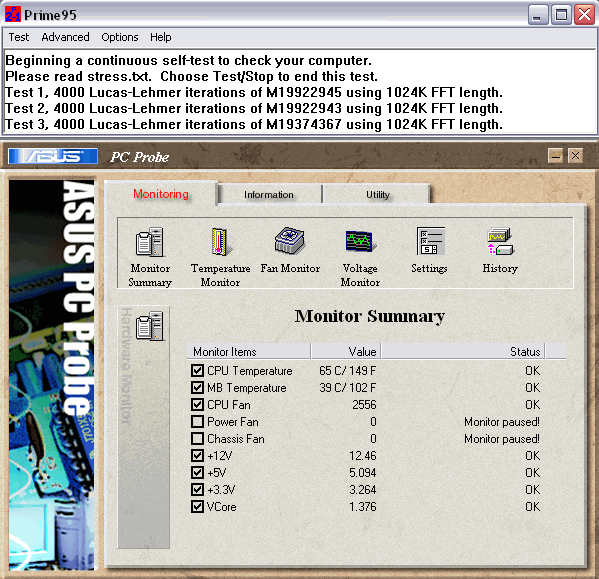
My idle CPU temps dropped from 42ºC to 40ºC and my full-load temps dropped from 65ºC to 51ºC. The noise level dropped from unbearable to barely noticeable as the fan speed before was over 2600 RPMs and now the fan speed never goes above 1500 RPMs, and has no problems keeping the CPU 14ºC cooler under load than before. That is a significant improvement in cooling and a lot nicer on my ears. Now the fan in my Radeon 9800 graphics card is the loudest thing that can be heard, which is the next thing to try and quiet down, possibly with a bigger, slower-spinning fan. These temps are definitely better than what they used to be, but still hot compared to an equivalant AMD processor, but I am overclocked to 3.6GHz, so for a Prescott core P4 on air cooling, it’s not bad for only $18. Overall I am very pleased with the new heatsink/fan and would recommend the Sunbeam for anyone trying to get better cooling with less noise and a hassle-free installation into any socket 775 mobo.

Stock 775 Intel heatsink/fan and a lot of dust
img_0043.jpg

The surface area of the Sunbeam is at least 3X that of the stock unit
img_0048.jpg

Asus P5P800 MB and a clean Intel Pentium 4 CPU ready for the new heatsink
img_0050.jpg

Perfect fit. I mounted the unit with the air flow going from front to back
img_0051.jpg

Stock Intel Cooling vs. the Sunbeam CR-SW-775 while running Prime95
asusprobeprime95.gif asusprobeprime95newcooler.gif

Posted in Computers | Leave a comment